

Welcome to the sQuid help page
Here you'll be able to find useful help videos and frequently asked questions (FAQ's).
To view an answer to an FAQ, simply click on the question and the answer will appear underneath.
Contacting sQuid Support
Our customer service team is email based and are open from 8am to 5.30pm Monday to Friday (excluding Bank Holidays). If you have sent a message and have not received a reply in 3 working days, please check your spam folder before sending another message. Please be assured that we will respond to all queries.Refunds
If you are requesting a refund, please be aware that this may take 7-10 working days to process and be received in your bank account.Before submitting your refund request, please ensure that you have:
- Disabled Auto top up on your account, if this is enabled
- Removed any stored payment card details
- Cancelled any direct debits linked to your sQuid account
Registration
Video: How to register your sQuid account
Click the video opposite to follow an easy step by step guide
on how to create a sQuid account, and how to add your
sQuid registration number.
Help Guide: How to register a sQuid account
Download and follow our step by step help guide.
> Click here to download the How to register a sQuid account guide
Help Guide: Add a user to your sQuid account
Have more than one child using sQuid?
> Click here to download the How to add a user to your sQuid account guide
Login
If you have forgotten your username, please click on the ‘Forgotten your username’ link on the login screen. An email will then be sent to your registered email address with your account username.
If you have forgotten your password, please click on the ‘Forgotten your password’ reset link at the bottom of the login screen. An email will be sent to your registered email address with instructions to follow to change your password.
Top up
Video: How to add funds to your sQuid account
This step by step video shows you how to top up and add funds to your Catering purse, and how to store your payment card for faster top ups.
You can top up:
- Using a UK or Irish credit or debit card (with the ability to store payment card details and enable Auto top up for a faster, more convenient way to top up)
- By bank transfer or standing order
Your online sQuid account may have more than one purse. Each purse has an 18 digit number and can be topped up to either pay for meals, transit journeys or used to make payments for school trips and other items.
To top up your purse please:
- Select the amount you want to add to your purse
- Click 'Add to Basket'
- Click 'View basket' and then click 'Checkout'
- Select the payment card type and then click 'Proceed'
- You will now be asked to enter your payment card details. Please ensure you enter the details exactly as they appear on your payment card
- To store your payment card, select the 'Store for future use' checkbox
- Click 'Pay Now' to complete your payment
Once you have successfully topped up your purse, you will receive a confirmation email from sQuid.
Once a successful top up has been made, you will receive a confirmation email to your registered email address. You will also see the top up show as 'Pending' on your sQuid account.
It may be that your school is not currently connecting to sQuid and therefore the account cannot be updated. Please rest assured that an alert email is sent to the school to notify them when they’re not connecting and we work as quickly as possible to resolve connectivity issues. Once the school is connecting back to sQuid, your balance and transactions will be updated instantly.
After you complete a top up, the funds will show as "Pending" on your account before being credited to your balance.
To collect the funds:
- Biometric users: When the catering system next connects to sQuid, the funds will then be made available
- sQuid card users: Present and hold your sQuid card to a sQuid reader on site. The funds will then be loaded on to your sQuid card
If you wish to top up an exact amount and this is not available in the 'Top up' drop down menu for the specific purse, please top up by bank transfer.
Please follow the steps set out on the 'Bank Transfer' page, which can be found by selecting the 'Top up' option in the pink navigation bar. Please remember to provide your unique 6 character purse reference to ensure your top up promptly reaches your purse.
Please note, that it may take up to 10 working days for your top up to be credited to your purse.
You can top up using a PayPoint top up card, which can be used at any local PayPoint retailer. Please check with your sQuid issuer to see if they offer PayPoint top ups.
- Present your PayPoint top up card at a participating retailer and confirm the amount you would like to add to your purse (you will need a separate PayPoint card for each sQuid purse)
- The retailer will use your PayPoint card to add funds to your purse
- Complete the transaction
- Funds will be available to spend within 24 hours of the transaction taking place
This is a fast way to top up a purse that is not linked to your sQuid account. To top up using the 'Friends & Family' option, please follow these steps:
- Select 'Top up' in the pink navigation bar
- Select 'Friends & Family'
- Enter the purse reference
- Select the amount to top up using the drop down box
- Click 'Add to Basket'
- Click 'Checkout'
- Select payment card type and click 'Next'
- Enter your payment card details
- Select the 'Store for future use' option if you would like to store your payment card
- Click 'Pay now'
Stored payment card
Video: How to update a stored payment card when Auto top up is enabled
Follow this step by step guide to update your stored payment card
when you have Auto top up enabled on your catering purse.
Video: How to pay using a stored payment card
This short guide shows you how to make a payment when you have one or more stored payment cards on your account.
Please follow the steps below to change your stored payment card on your account:
Removing stored payment details:
1. Log in to your account2. Click ‘Settings’
3. Click ‘Payment Settings'
4. Click 'Remove card'
To add a new payment card:5. Click ‘Top up’ in the pink navigation bar
6. Click ‘Debit or Credit card’
7. Select or enter the amount you wish to top up
8. Click ‘Add to basket'
9. Click ‘View basket' at the top of the screen
10. Click 'Checkout' and follow the onscreen instructions to enter your payment card
11. Click the 'Store for future use' checkbox to store your new payment card
To store a payment card you will firstly need to top up your account. After entering your payment card details on the Checkout page, simply select the 'Store for future use' box.
To view your stored payment card details simply:
- Select 'Settings' in the pink navigation bar
- Select the 'My stored payment card' option
- Click'Settings' in the pink navigation bar
- click 'Payment Settings'
- Click the 'Remove card' button
Yes, simply top up your account and select the 'Store for future use' checkbox on the Checkout payment details page.
- Select or enter the amount you wish to top up or pay
- Click 'Add to basket'
- Next, click 'View basket'
- Click 'Checkout'
- Enter the CVV number on the back of your payment card in the box indicated within the payment card image
- Click 'Pay Now'
Auto top up
Video: How to enable Auto top up
An easy to follow video on how to enable Auto top up on your catering purse.
This also features a quick guide on how to manage Auto top up payments when you have multiple stored payment cards.
Yes. You can either set up a standing order, or alternatively, you can enable Auto top up to add funds to your purse when the balance falls below a predetermined amount.
To enable Auto top up you must first make a top up on your account and store the payment card details by selecting the 'Store for future use' checkbox on the Checkout payment details page.
Once your payment card has been stored:
- Select 'Top up' in the pink navigation bar
- Select 'Auto top up'
- Select the 'Auto top up enabled' option
- Set the prerequisites for Auto top up to trigger on your account
- Click the 'Save' button
You are required to make a top up as this is a security measure that verifies your payment card.
Please check that your payment card is not due to expire and that you have available funds.
If you would like to deactivate auto top up, please:
- Log in to your account
- Select ‘Top up’ in the pink navigation bar
- Select 'Auto top up'
- In your catering purse, deselect 'Auto top up enabled'
- Click the 'Save' button
Where multiple stored payment cards are stored on your account, you can decide at any time, which payment card is used for Auto top up.
- Go to 'top up' in the pink navigation bar
- Select 'Auto top up'
- Use the dropdown arrow to select the payment card you wish to use for Auto top up
- Click the 'Save' button
Account management
A sQuid registration number is a 16 digit number provided to you by your sQuid issuer (school, place of work or travel provider).
If you use a sQuid card you will find this number on the back of the card.
If you use a biometric identifier> this number will be provided by your sQuid issuer, usually in a registration letter.
A Display name is the name you enter when you assign to a new sQuid registration number added to your sQuid account. If you have multiple users on your account, this will help you to differentiate between the users and their purses.
Please follow the steps below to change your email address:
- Select 'Settings' in the pink navigation bar
- Select 'Change email address'
- Confirm the requested characters from your password
- Enter your new email address
Please note that when you have changed your email address by following the steps above, you will receive a verification email to your new email address in order for you to confirm the change. Please ensure that you complete this step otherwise access to your account will be restricted. If your username is the same as your registered email address, then kindly note that once you have completed all of the above steps, your username will automatically change to be the same as your email address.
You can change your password by going to Settings and under Security Settings select Change password. You will be asked to confirm your current password before you enter and confirm your new password. After you have confirmed your new password, please click Save.
Yes, you can change your personal information by going to Settings and then under Personal Details click on the field you wish to update. Enter the new information and then click the Save button.
Yes, to change your security question and answer, please go to Settings and under Security Settings go to the option Change security question. Firstly, enter your password and then you will be able to select a new security question and enter the answer. Once done, please click Save.
Please contact your sQuid issuer (this will either be your school, employer or travel provider) so they can organise a replacement card or fob for you, and then follow the instructions below:
sQuid card users:
- Log in to your sQuid account
- Go to the Userstab
- Find the user who requires the replacement card and then enter the new 16 digit sQuid registration number on the back of the new card, the 3 digit CVV and then click Replace
- A message will be displayed asking if you are sure you want to remove the card. Please ensure that you read and understand the information provided. Once you are happy to proceed, click Yes, remove it!.
Biometric fob users:
- Your replacement fob should automatically link to your sQuid account, so you will not need to do anything.
If you do not recognise a catering charge on your sQuid account, or you believe that you have been incorrectly charged for items, please contact your child's school directly so they can look into this for you. As sQuid is not based in the school, we will be unable to investigate for you.
We are unable to transfer a sQuid registration number from one school to another, as each 16 digit sQuid registration number is linked to a specific school. Once you have received the sQuid registration details from your child's new school, simply add these details to your existing account:
- Log in to your sQuid account
- Go to 'Users' in the menu bar
- Click 'Add a user'
- Enter your child's new 16 digit sQuid registration number, 3 digit CVV code and assign a new display name
If you have any unused balance on your child's old sQuid purse, you can transfer it to the new purse using the Balance Transfer tool.
When the child moves to a new carer, they will need to re-register the sQuid account so they may log in and top up as required.
Dependent on the age of the child, it may be best for them to register the account themselves, in their own name and using their school email address, as this would mean they are the registered account holder and will be able to seamlessly continue using their account.
Should you register the account with your own details, please contact sQuid so we may unregister the account and refund any remaining balance, ready for a new carer to re-register.
Please ensure you have removed any stored payment card details and disabled Auto top up, and stopped any standing orders to the sQuid account.
If you have sent a message but have not received a reply in 3 working days, please check your spam folder before sending another message. Please be assured that we reply to all queries.
Yes, you can manage your sQuid account using the sQuid app, however, please be aware that some of our latest features, such as the Balance Transfer tool, are not currently available to use on the sQuid app. We would therefore suggest using the Customer Portal should you need to you the latest account features.
Whether you have accidentally topped up too much, or realise that you have a surplus balance on your account, you can process a Balance Withdrawal to request the funds are returned back to you.
To do this, simply click on the Request a balance withdrawal for this purse link and entering the amount you want to withdraw from our sQuid account, before clicking the Withdraw button. You should also contact our Support team to request that the account is closed on our system.
Funds will be returned to the payment card used to top up or make payment to sQuid. If for any reason we are unable to refund the balance back to your payment card, we will contact you to request your bank account details.
Before you submit your Balance Withdrawal request, please ensure that Auto top up has been disabled, any stored payment card details have been removed and any direct debits have been cancelled.
Please note that if your child attends a school which falls under Nottingham Council, you may need to contact the school directly to arrange the refund for you.Childcare Vouchers
Help Guide: How to use Childcare Vouchers
Follow the step by step guide to pay for school items using your Childcare Vouchers
Please be aware that not all items made available by the school can be purchased using Childcare Vouchers.
If your child's school allows payment by Childcare Vouchers, they will enable this payment option on your sQuid account. Once this been set up, you will see the Childcare Voucher funds balance available on your account when you next log in.
The school will indicate onscreen which items are eligible for purchase using the Childcare Voucher balance.
- Select the item you want to purchase and add it to the basket
- To allocate your Childcare Voucher funds, select 'Add option' and then click 'Confirm'
- Enter the amount you want to allocate from your Childcare Voucher funds and select 'Confirm'
- If your Childcare Voucher funds balance does not cover the cost of the item you are purchasing, the remaining balance to be paid will be displayed. Click 'Confirm and add to basket' to complete the payment process
School meals
Biometric users: Use your unique identifier to access and use your funds. The cost of the item(s) purchased will be deducted from your account.
sQuid card users: Present and hold your sQuid card to a sQuid reader in the catering outlet. The cost of the item(s) purchased will be deducted from your account.
Yes, select 'Transactions' in the pink navigation bar and select the purse that you would like to view transactions for.
Please contact your school in the first instance who should be able to advise what you need to do to apply for Free School Meals.
Although your child receives Free School Meals you may still wish to register your sQuid account so that you can view the transactions and meals whch have been processed on your account.
If your child's school also use sQuid to collect payments for school trips, offers and other activities, you will need to register your sQuid account in order to make payment towards that itme.
As we are not based at the school, please contact the school's catering department who will be able to look into this for you and arrange any necessary refunds.
If you do not recognise catering charges on your account or believe that you have been incorrectly charged for items, please contact your child's school directly so they can look into this for you. As we are not based at the school, we will be unable to investigate the transactions for you.
Meal pre-order
Please note, meal pre-order is only required at selected schools. If you are unsure if this is applicable to you, please check with your child's school.
Help Guide: How to pre-order your child's meal
Download the help guide and follow the steps to pre-order your child's meal.
> Click here to download the step by step meal pre-order help guide
Please note, the cost of a meal will be deducted from your catering purse balance at the end of each day.
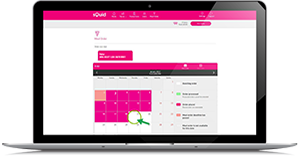
- Top up your catering purse with enough funds to cover all of the meals that you would like to order. If your child is entitled to any free school meals, you do not need to top up
- Click on the user that you would like to place an order for, and then click Meal Order in the pink navigation bar
- Simply click on a specific day in the future to access the meal options for that day
- If your child is entitled to any free school meals, the price of a meal will still be shown but you will not be charged
- Once you have made your selection, a green tick will appear next to your choice
- Click Save to confirm
- The Order placed confirmation message will appear on screen, and the selected date on the calendar will change from white to pink
- Simply repeat steps 3 and 4 for each day that you would like to order a meal for
The meal order calendar will show you the available dates you can pre-order a meal for.
Your child's school will be able to confirm the latest day and time by which you need to pre-order your child's meals.
Yes, you can change your meal choice if it is prior to the cut off time, however, if the cut off time has lapsed, you will need to contact your child's school to request any changes.
Yes, you can view any meals order which have been placed by clicking on 'View orders'.
School Trips & Offers
Video: How to pay for a school trip
This help video shows you how to pay for a school trip; whether it is
in the full amount, or by instalment.
Video: How to buy school uniform items
An easy to follow guide on how to pay for school uniform with sQuid.
The availability of school trips and offers are managed by the school. Please contact the school office directly so they may ensure that your child’s sQuid account has been linked to the desired trip or offer - so you may make the purchase.
- Go to the Trips & Offers purse and click on 'offers available'
- Select the items that you would like to purchase and click 'Add to basket'. Please note, you will be able to select the uniform style options later on in the checkout process
- Next, click 'View basket' at the top of the screen
- To use the available funds from your purse balance towards the payment of the item, select the 'Pay for this offer using available purse funds' checkbox. Then, select 'Checkout'. If the balance does not cover the full item value, the remaining amount to be paid will then be displayed
- Select the uniform style (e.g. size and colour) from the options provided, then click 'Finish'
- Review the offer summary and click 'Checkout'
- To make payment with a credit or debit card, please follow the onscreen instructions
- A confirmation email will be sent to your registered email address
Please contact your child's school in the first instance, as they will be able to advise you on how the refund will be processed.
If the school refund the money back to your School Trips & offers purse, then please email our Customer Service team at customerservice@squidcard.com providing your 16 digit sQuid registration number and the amount to be refunded. Please note that refunds will be paid back on to the payment card you used to make the purchase.
sQuid App
Please note, that some funtionality is currently unavailable in the sQuid app, and we therefore suggest that you log in to your sQuid account here and use the sQuid Customer Portal where possible.
Yes, however, you must have a registered sQuid account to use the App.
Yes you can. Once you have downloaded the App, please follow these steps:
- Complete your personal details. An asterisk (*) denotes a mandatory field
- Choose a password
- Select a security question and enter the answer
- Click ‘Register’
- Choose a display name
- Enter your 16 digit sQuid registration number and 3 digit security code.
- Select the Menu bar on the top left of the screen
- Click on ‘Settings’
- Edit the desired details
- Select the Menu bar on the top left of the screen
- Select ‘Change email address’
- Enter the requested characters from your password
- Confirm your current email address
- Enter the new email address
- Select the Menu bar on the top left of the screen
- Click on ‘Change security question’
- Enter the requested characters from your password
- Select a new security question from the dropdown list and enter the answer
- Select the Menu bar on the top left of the screen
- Click ‘Change password’
- Enter the requested characters from your current password
- Enter your new password
You can top up using a UK or Irish credit or debit card, simply:
- Log in to your account
- Click on the account you wish to top up
- Choose the amount you wish to add to the balance and click ‘Add to Basket’
- Click ‘View Basket’ at the top of the screen
- Click ‘Checkout’
- Select to use a previously stored payment card or enter the details for a new payment card
- Click ‘Make Payment’
- If you wish to store these payment card details, click the check box at the end
To store a payment card you will firstly need to top up your account. After entering your payment card details on the Checkout payment details page, simply select the 'Store for future use' box .
Yes you can, if your payment card details have been stored.
- Click on the account you wish to enable Auto top up on
- Click ‘Show more’
- Click ‘Manage Auto top up’
- Click the check box ‘Auto Top Up Enabled’
- Select the prerequisites to trigger Auto top up
- Select the menu bar at the top left of the screen
- Click ‘Friends & family’
- Add the Purse Number or Purse Reference for the account you wish to top up and select the amount
- Click ‘Add to Basket’
- Click ‘View Basket’
- Click ‘Checkout’
- Enter your payment card details or use a stored payment card to make payment
- Click ‘Make Payment’
Yes you can. Simply click on the ‘Add User’ button, then create a Display name for each child, enter their sQuid registration number and security code, and then click ‘Add User’
Click on the Display name for the account transactions you wish to view, and click ‘View Transactions’.
Additional help videos
How to move a user from one sQuid account to another
A step by step guide showing you how to remove a user from one sQuid account, allowing you to add that user to another account, so that you can access and manage multiple users via one login.